

inFlow Inventory
inFlow Inventory: A Review and How It Can Improve Your Sales
Fast, accurate fulfillment is what makes a first impression stick — and it costs a lot less to keep a happy customer than to win a new one. Every bit of that starts with knowing exactly what you have, where it is, and how much of it.
That’s the problem inFlow Inventory is built to solve. It’s a subscription-based cloud inventory system, so there’s no big upfront software spend — you pay a monthly fee instead, without needing in-house IT expertise to get it running.
What is inFlow Inventory?
inFlow is an all-in-one inventory management platform available as a Windows desktop app, a browser-based web app, and mobile apps for Android and iOS. There’s no native Mac app, but Mac users can use the web version.
Getting started takes about 10 minutes: sign up, set your credentials, and you’re in a 14-day trial before you need to subscribe. A detailed knowledge base and YouTube channel cover onboarding if you get stuck.
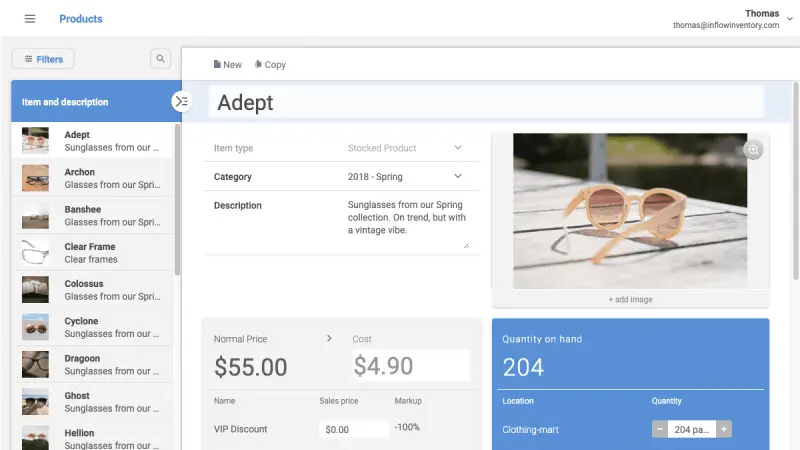
Core features include product profiles, serialized products, multiple costing methods (FIFO, LIFO, moving average, or manual), barcodes with multi-tier pricing, stock transfers and counts, full movement history, separate sales/purchasing units of measure, warehouse locations, and manufacturing work orders on eligible plans.
What Makes It Different
A cloud database, not local storage
Your data lives on Microsoft Azure, not on any single device — the mobile app, web app, and Windows software all read from and write to the same cloud database. That means no data loss if a laptop dies or a phone gets stolen, and no waiting for a nightly sync: a stock change on one device shows up everywhere else immediately.
The trade-off is that you need an internet connection — there’s no offline mode. In practice, most businesses are already online for orders and email, so this rarely matters day to day.
Features split sensibly across platforms
Not every feature needs to live on every device:
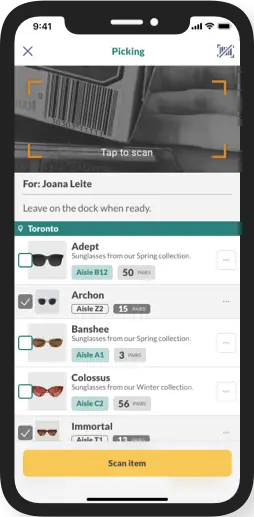
- Mobile app — View vendors, customers, POs, SOs, products; scan barcode via the phone’s camera; check current stock, adjust and transfer stock
- Web app — Full functionality
- Desktop (Windows only) app — Full functionality except cannot manage users/rights, and cannot create or edit Showroom (B2B Portal)
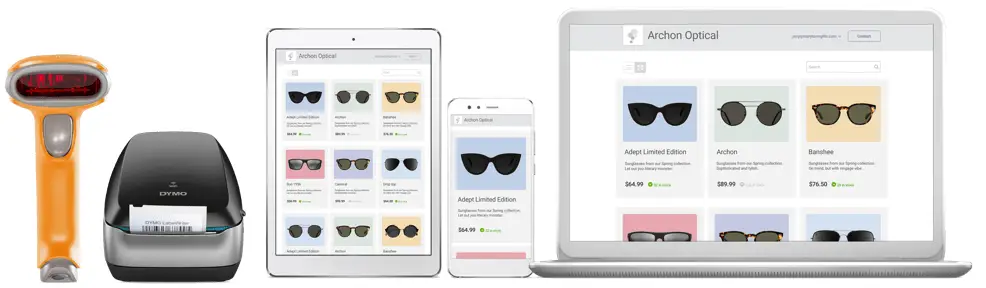
It’s a sensible split for how most warehouses actually operate, though giving salespeople mobile access to movement history could be a nice addition for spotting trends on the go.
Sales and purchase orders built in
inFlow goes beyond basic stock tracking — it manages the full order lifecycle: creation, fulfillment or receipt, and returns. That structure enforces good habits: stock can’t just disappear; it has to leave via a sales order, a transfer, or a logged adjustment. Even giveaways get recorded as zero-value sales orders. E-commerce orders flow straight in as sales orders automatically.
Native QuickBooks Online and Xero integration
When a sales order is invoiced and paid, or a purchase order is received and payable, inFlow pushes that straight into QuickBooks Online or Xero — purchases become bills, sales become invoices, and your inventory asset and cost-of-goods-sold values update automatically.
inFlow has also expanded its Xero integration to sync payments in both directions and map Xero tracking categories and payment methods, so reconciling what’s been paid is less manual than it used to be. Inventory and order data still flows one way, from inFlow into your books — inventory software is for warehouse, sales, and procurement staff, not for running your accounts, and payments themselves are collected through the accounting side (except for US/Canada-registered businesses using inFlow’s built-in payments).
Pricing that scales with your team and inventory locations
- Lite — aimed at solo operators with a single inventory location, and requires integrations
- Core — for growing teams, with more users, not more than 5 locations, and integrations included
- Pro — for larger teams with unlimited locations, integrations, and advanced features like APIs, Showroom, and more access rights controls.
InFlow updates its limits and prices from time to time — see inFlow’s current pricing for the exact numbers before you commit.
How This Actually Moves Your Business
Stock information that’s always current. Knowing exactly what’s on the shelf changes how confidently you can quote a customer — an appliance repair shop that knows a part is in stock can promise a 3-day turnaround instead of hedging with “maybe three weeks.”
What you show online matches what you actually have. Two common ways this goes wrong: showing less stock than you really have (leaving sales on the table), or showing more than you have (scrambling to fulfill an order you can’t cover). inFlow connects directly to Shopify and WooCommerce, so a sale anywhere reserves stock in inFlow immediately and your storefront reflects it right away — one database, one source of truth.
Reorder reminders before you run out. Demand spikes happen. inFlow emails you when stock drops below the minimum you’ve set, on a daily or weekly schedule, and its forecasting reports help you work out realistic reorder points — ideally sized around your suppliers’ average and worst-case lead times, so you’re not stockpiling or stocking out. If you’re not sure where to set those minimums, see our guide to setting reorder points that actually work.
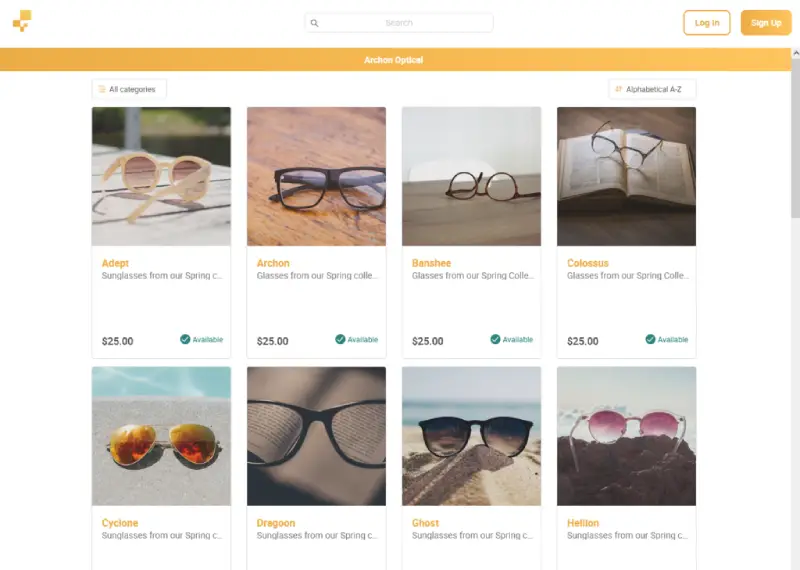
A storefront for your best customers. The inFlow Online Showroom lets you share live product and stock info with customers directly — including VIP pricing separate from your standard rates — and take orders through it. (Order submission works everywhere; built-in payment processing is US/Canada only.)
Fewer manual-entry mistakes. Wrong product, wrong quantity, wrong warehouse, wrong date — data entry errors are the single biggest source of inventory headaches. inFlow supports generating, printing, and scanning barcodes from the mobile app or a dedicated Smart Scanner accessory, cutting out manual product lookups across sales orders, purchase orders, counts, transfers, and receiving.
The Smart Scanner is noticeably faster than scanning through the mobile app — see this side-by-side scanning comparison to judge for yourself.

Frequently Asked Questions
Is inFlow Inventory free?
No. There’s no permanently free plan — you get a 14-day free trial with no credit card required, then pick a paid plan based on your order volume, team size, and the features you need.
Does inFlow Inventory work on Mac?
There’s no native Mac app, but the full web app runs in any browser, so Mac users get real-time access to stock levels, orders, and reports. A handful of advanced features are still Windows-app only.
Can inFlow Inventory sync with my online store?
Yes. inFlow connects directly to Shopify and WooCommerce, so a sale on either platform updates your stock in inFlow immediately, and your storefront reflects the new count right away — no manual double-entry.
Is my inventory data safe if a device is lost or breaks?
Yes. Your data lives on Microsoft Azure’s cloud infrastructure, not on any single laptop or phone, and it’s backed up automatically in multiple locations. Losing a device doesn’t mean losing your records.
If you’ve outgrown spreadsheets for tracking stock, our guide on the signs your business has outgrown spreadsheet inventory tracking walks through what to look for before you switch.
Worth Trying
If any of this sounds like it would fix a real gap in how you’re tracking stock today, inFlow offers a 14-day free trial with no credit card required. We help businesses set up, migrate, and integrate inFlow Inventory end-to-end — get in touch if you’d like a hand.